
Onchain Storage
Querying With GraphQL
You can query Irys transaction metadata using GraphQL. Use an HTTP library like fetch or axios, or specialized clients like Apollo Client or urql.
If Irys-run gateways are unavailable, you can run your own: the gateway is open source.
Endpoint
https://uploader.irys.xyz/graphqlAnatomy of a Query
A GraphQL query is made up of:
- Query argumentsSpecify search parameters, limit the number of results returned, or enable pagination.
- Results fieldsFields that define the data you want to retrieve.
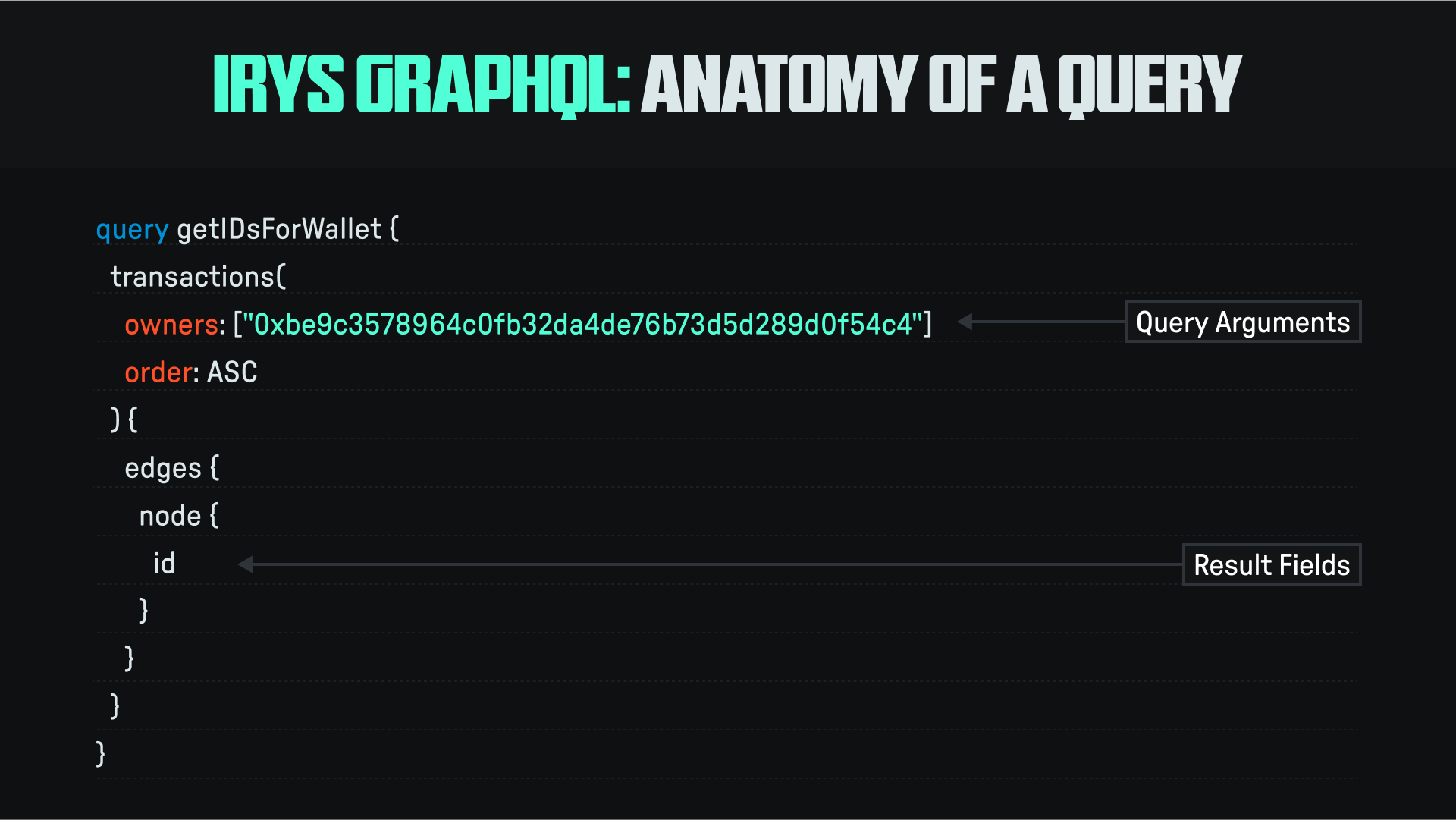
Query Arguments
Any of the following query arguments can be used as search parameters:
| Field | Description |
|---|---|
ids | An array of transaction IDs passed as strings. Values are ORed together, matching results will include transactions that have any of the supplied IDs. |
owner | The address used when posting the transaction. Can be a native address from any of the chains supported by Irys. Note in results fields, this is referred to as address. |
token | The token used to pay for the transaction. |
tags | An array of tag name / value pairs passed as JSON objects. |
Results Fields
When building a query, any of the following values can be included in your results:
| Field | Description |
|---|---|
id | The transaction ID. |
address | The address used when posting the transaction. Can be a native address from any of the chains supported by Irys. Note in query arguments, this is referred to as owner. |
token | The token used to pay for the transaction. |
receipt { deadlineHeight signature version } | An optional receipt, only exists if a user requested one at upload. deadlineHeight: The block number by which the transaction must be finalized. signature: A signed deep hash of the JSON receipt. |
tags { name value } | An array of tags supplied as name / value pairs. Exists if the user added them at upload. |
timestamp | The timestamp, accurate to the millisecond of when the transaction was posted. This value is the same as the receipt timestamp. |
GraphQL Sandbox
Clicking on the endpoint URL will take you to the GraphQL Sandbox used for building and testing queries. Press Control+Space at any time to see an interactive popup window of either query arguments or results fields.

Sample Queries
Queries return transaction metadata. To then retrieve data, use the returned transaction ID and download the data from the Irys gateway using a URL formed as: https://gateway.irys.xyz/:transactionId
Transaction IDs
Search by transaction IDs:
query getByIds {
  transactions(ids: ["--52WQHJIJod_rni8pkl1Vxt9MFGoXZAm8SC7ex6C1o", "--52THRWpX_RJzGcNXmtQ2DSP37d1e1VQ4YmvbY5ZXo"]) {
    edges {
      node {
        id
        tags {
          name
          value
        }
      }
    }
  }
}
Timestamps
Search by timestamps:
query getByTimestamp {
  transactions(timestamp: { from: 1688144401000, to: 1688317201000 }) {
    edges {
      node {
        id
      }
    }
  }
}
Owners
Search for transactions matching the wallet address used when posting the transaction:
query getByOwner {
  transactions(owners: ["0xBcb812C6e26F4F0F78Bd7B6222461FF24F2942AE", "0xaC568a981B1370B2e1bAA8cE30BD5AC9E28C572D"]) {
    edges {
      node {
        id
        address
      }
    }
  }
}
Tags
Search for transactions matching tag name / value pairs:
query getAllPNGs {
  transactions(tags: [{ name: "Content-Type", values: ["image/png"] }]) {
    edges {
      node {
        id
        address
      }
    }
  }
}
Search for transactions matching the tag with name Content-Type and the values of image/png OR image/jpg:
query getTagsWithOR {
  transactions(tags: [{ name: "Content-Type", values: ["image/png", "image/jpg"] }]) {
    edges {
      node {
        tags {
          name
          value
        }
      }
    }
  }
}
Search for transactions matching the tag with name Content-Type and the values of image/png AND image/jpg:
query getTagsWithAnd {
  transactions(
    tags: [
      { name: "Content-Type", values: ["image/jpg"] },
      { name: "Content-Type", values: ["image/png"] }
    ]
  ) {
    edges {
      node {
        tags {
          name
          value
        }
      }
    }
  }
}
Limiting Results
Limit the number of results returned by including the limit parameter:
query getAllPNGs {
  transactions(limit: 10, tags: [{ name: "Content-Type", values: ["image/png"] }]) {
    edges {
      node {
        id
        address
      }
    }
  }
}
Pagination
You can request a maximum of 100 results returned from each query. To obtain additional results, use pagination. When using pagination you:
- Retrieve the cursor field, which acts like a bookmark in the search results you can then return to.
- Use the saved cursor value to obtain subsequent search results.
The following query returns 10 transactions tagged image/png occurring after a given cursor. To obtain the next 10 transactions, use the final cursor value returned from this query as the value of the after parameter in the following query:
query getPNGs {
  transactions(
    limit: 10
    tags: [{ name: "Content-Type", values: ["image/png"] }]
    after: "LS02d1NsM3R6aUprd3dKUzVjN1FXaWg5aUxsbXh5dVJJbGlydHJtNlpPbw"
  ) {
    edges {
      node {
        id
      }
      cursor
    }
  }
}
Sorting
Sort results by timestamp in either ascending or descending order using the order field:
query getAllByOwnerAsc {
  transactions(owners: ["0xBcb812C6e26F4F0F78Bd7B6222461FF24F2942AE"], order: ASC) {
    edges {
      node {
        id
        address
      }
    }
  }
}
query getAllByOwnerDesc {
transactions(owners: ["0xBcb812C6e26F4F0F78Bd7B6222461FF24F2942AE"], order: DESC) {
edges {
node {
id
address
}
}
}
}